Total control over your company’s spending and payments.

Visa cards, funds by area and 24/7 SPEI payments on a single platform, so day-to-day operations keep moving without losing control.

100% online sign-up in minutes and a decision in under 2 hours.* No branches and no printed paperwork.

Company director with her GoTapp card
GoTapp Básica card, blue with a world map and the VISA logowww.gotapp.ai
SOFOM E.N.R.Registered with CONDUSEF; supervised by the CNBV for AMLVisa global networkYour card works wherever Visa is acceptedPhysical and virtualA card for every team memberSPEI 24/7Send and receive at any hour, every day
Benefits

What your company gains from day one.

Less cash, fewer reimbursements and fewer spreadsheets. More control over every peso that goes out.

Real-time visibility

Every purchase and every transfer shows up instantly, with who, where and which area.

Rules before payment

Limits, merchant categories and schedules are checked at purchase, not in the month-end reconciliation.

Instant cards

Issue a virtual card in seconds for a team member, a trip or a supplier.

Funds by area

Each area receives its budget with its own CLABE and never spends another’s.

Receipts without chasing

The receipt is uploaded from the phone and linked to its purchase and its area.

Fast sign-up, decision in 2 hours

You sign up in minutes from the portal and get an answer in under 2 hours.*

Multiple companies, one login

Operate all your legal entities with permissions and reports per company.

Audit-ready

A log of every action: who did it, when, and who approved it.

The portal

All your company’s money, on a single screen.
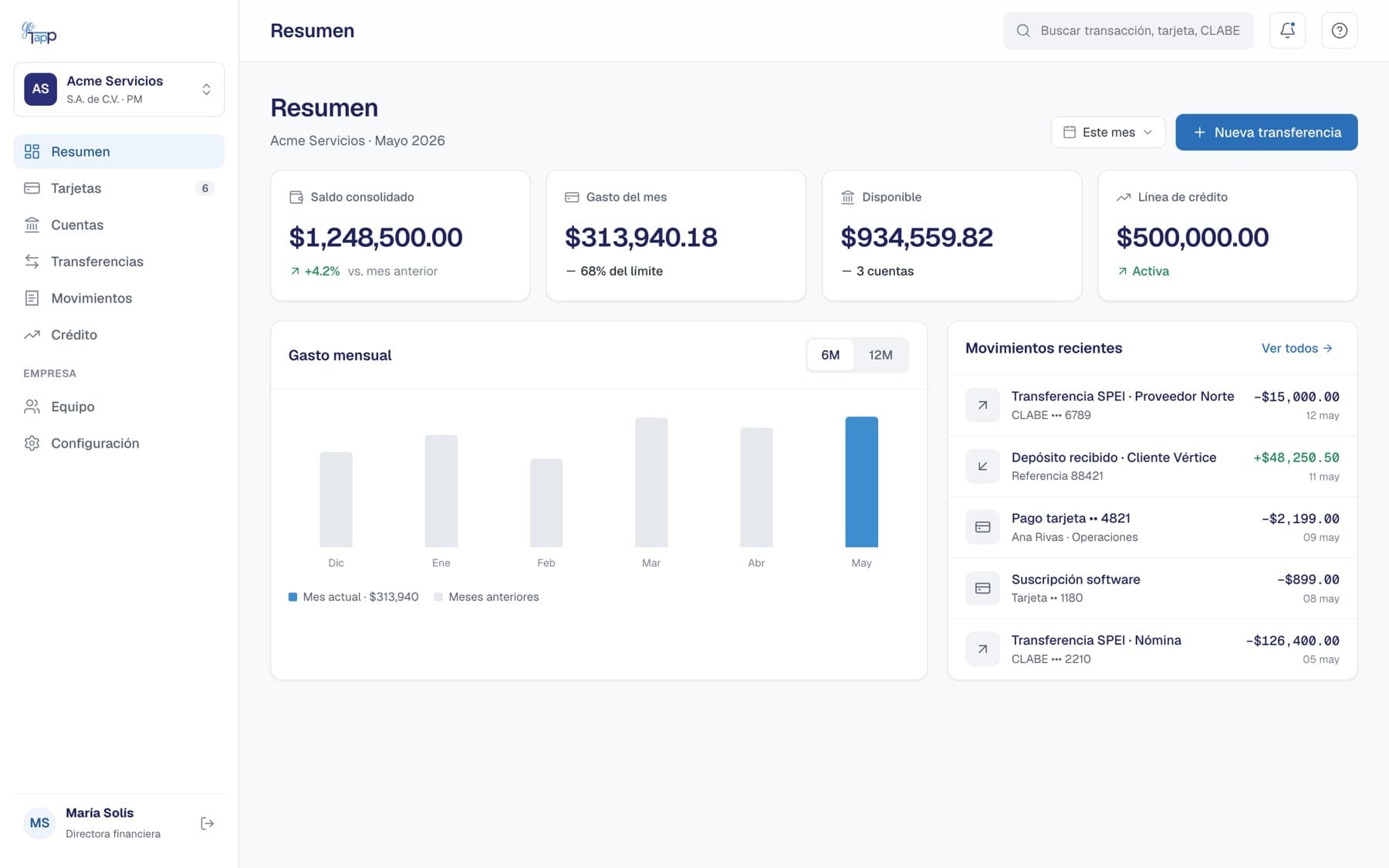
Balances by area, spend for the month and every transaction in real time. No waiting for the account statement to know where the money went.

app.gotapp.com.mx/resumen
GoTapp portal Summary screen with consolidated balance, spend for the month and recent transactions
Portal Summary screen. Sample data.
Funds by area

What is available in the master account and in each area, at a glance.

Spend against budget

How much each area has spent and how much it has left this month.

Transactions as they happen

Card purchases, SPEI received and sent, with who and where.

Corporate cards

Three cards. One for every way of spending.

Physical and virtual, one per team member. Freeze them and adjust their limits instantly, from the portal or the app.

GoTapp Every day card, black with a globe and the word Corporatewww.gotapp.ai
GoTapp Infinite card, midnight blue with a world map and the VISA logowww.gotapp.ai
GoTapp Básica card, blue with a world map and the VISA logowww.gotapp.ai

Básica

For the team’s day to day

The card for whoever goes out to operate: travel expenses, material purchases, on-site supplier payments.

Format
Physical and virtual
Design
Blue with a world map
Controls
Limits, merchant categories, schedule and merchants
GoTapp Every day card, black with a globe and the word Corporatewww.gotapp.ai

Every day

For online purchases and subscriptions

One card per digital vendor. If a service changes its price or you cancel it, you just freeze that card.

Format
Virtual; physical optional
Security
Dynamic CVV in the app
Delivery
Instant
GoTapp Infinite card, midnight blue with a world map and the VISA logowww.gotapp.ai

Infinite

For executives and flagship accounts

For whoever represents the company: business meals, travel and executive expenses.

Format
Physical and virtual
Design
Midnight blue with a world map
Plastic
No charge

Issue a card the moment you need it.

From the portal you register the team member, choose the area and its rules, and the virtual card is ready to use.

  • Limit and monthly spend per cardholder
  • Alert when someone nears their limit
  • Freeze or reactivate in one click
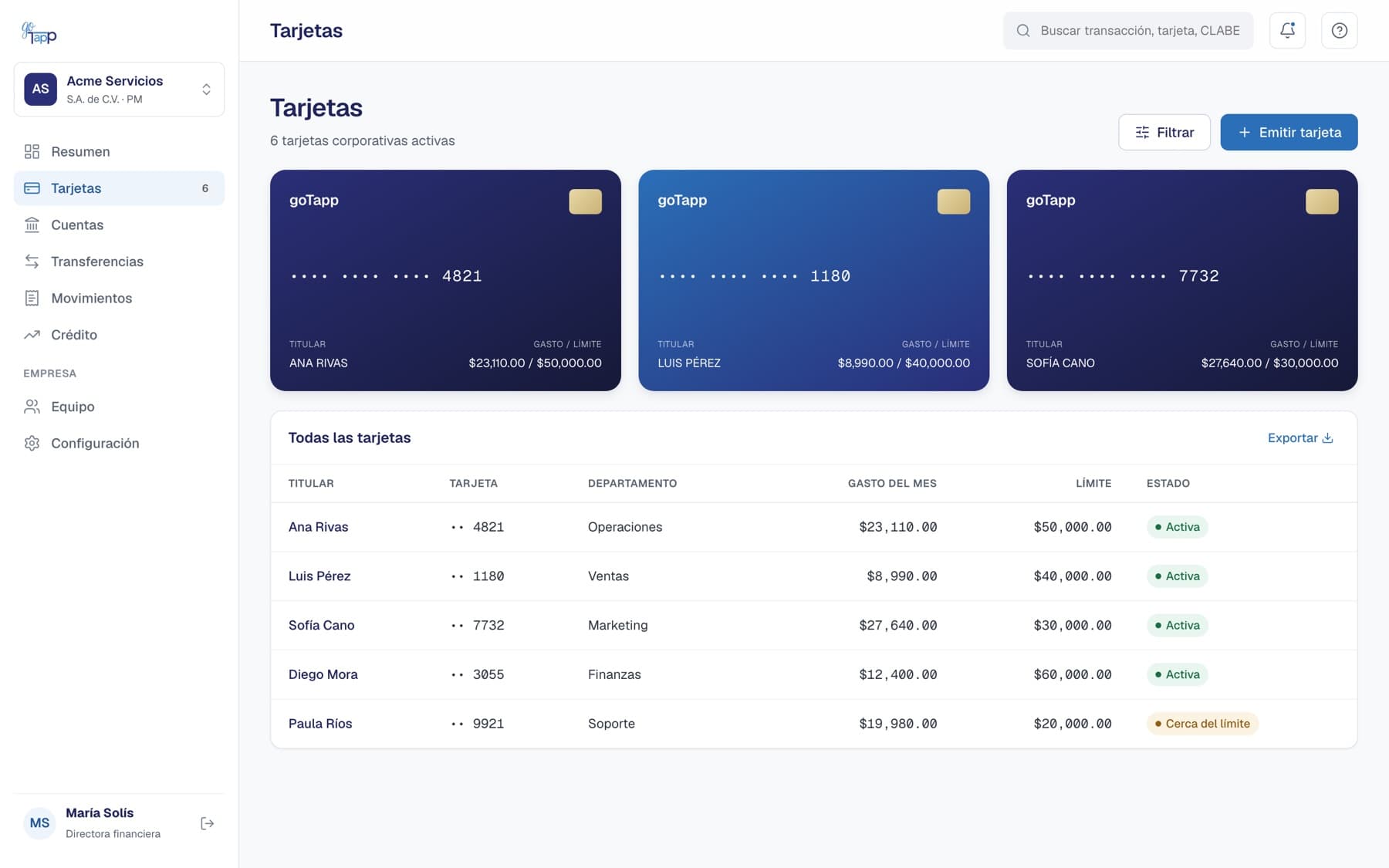
app.gotapp.com.mx/tarjetas
Cards screen with the list of cardholders, area, monthly spend and limit
Cards screen. Sample data.
Day to day

Wherever your team has to pay, their card is there.

Work trips, client meals, subscriptions and operating purchases. Every expense reaches the portal with its receipt and its area.

Director checking in at a hotel abroad with her GoTapp card
Business travel. Hotel, flights and transport on the trip card, with no cash advances or reimbursements.
Business meal paid with a GoTapp Infinite card
Client meals. The executive Infinite card, with a per-event limit.
Consultant paying from his phone in an airport lounge
Online purchases. Flights, luggage or software with a virtual card created for that purpose.
Finance manager photographing a receipt with her phone
Receipts without chasing anyone. The receipt is uploaded from the phone and linked to the purchase.
CLABE per area

Money flows down by area. It never all comes out of the same pot.
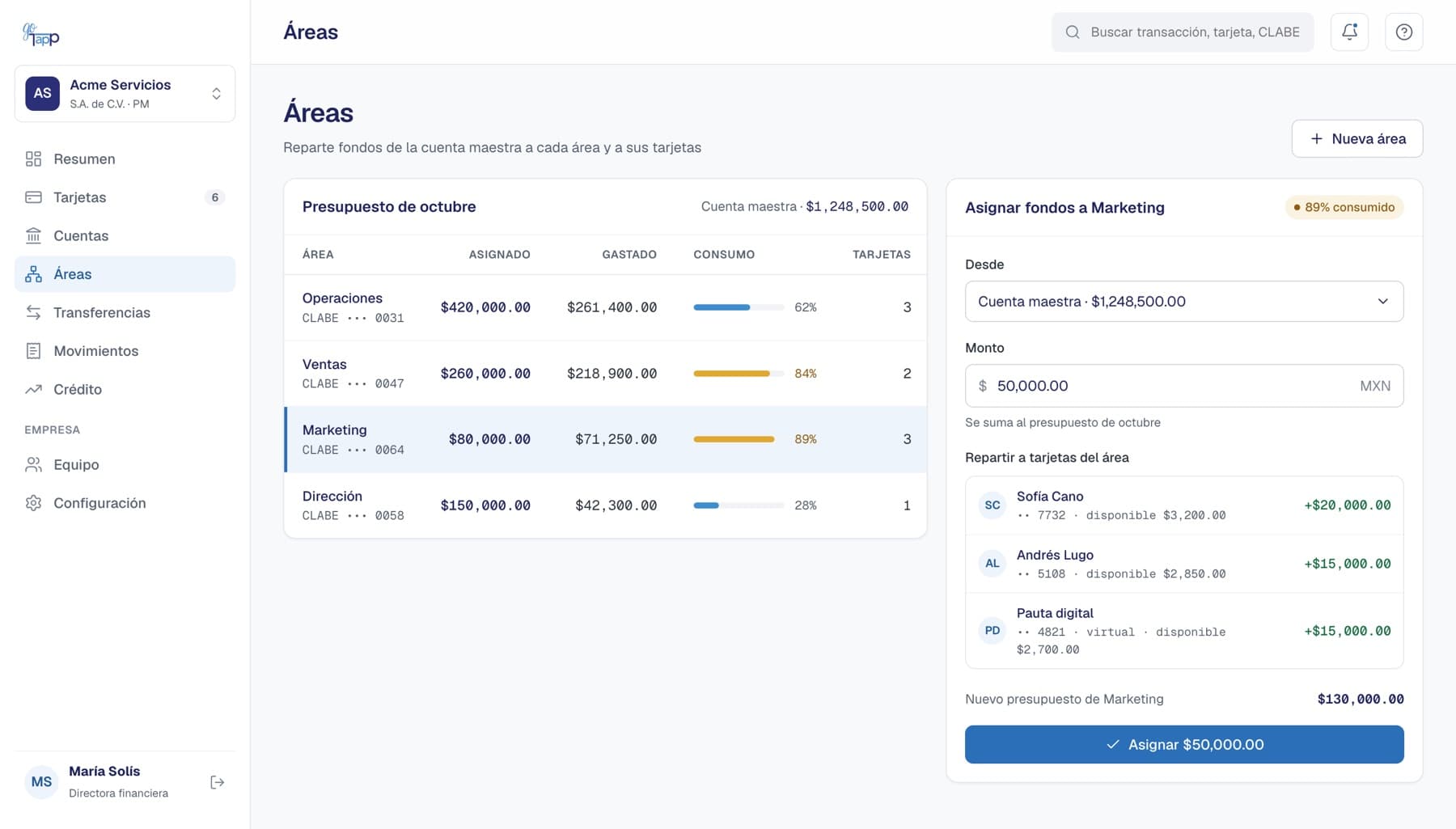
Your master account allocates to each area, and each area to its owners. Each card spends only what you assigned it.

Master accountOwn CLABE · receives your customers’ payments
OperationsOwn CLABE · 3 cards · monthly budget
SalesOwn CLABE · 2 cards · fuel and meals only
MarketingOwn CLABE · 3 cards · digital ads and events
ExecutiveOwn CLABE · 1 Infinite card
app.gotapp.com.mx/areas
Areas screen: Marketing at 89% of its budget receives $50,000 from the master account, split across three cards
Marketing is at 89% of its budget: you assign it $50,000 from the master account and split it across its cards.
24/7 SPEI transfers

Collect and pay from the same place where you control your cards.
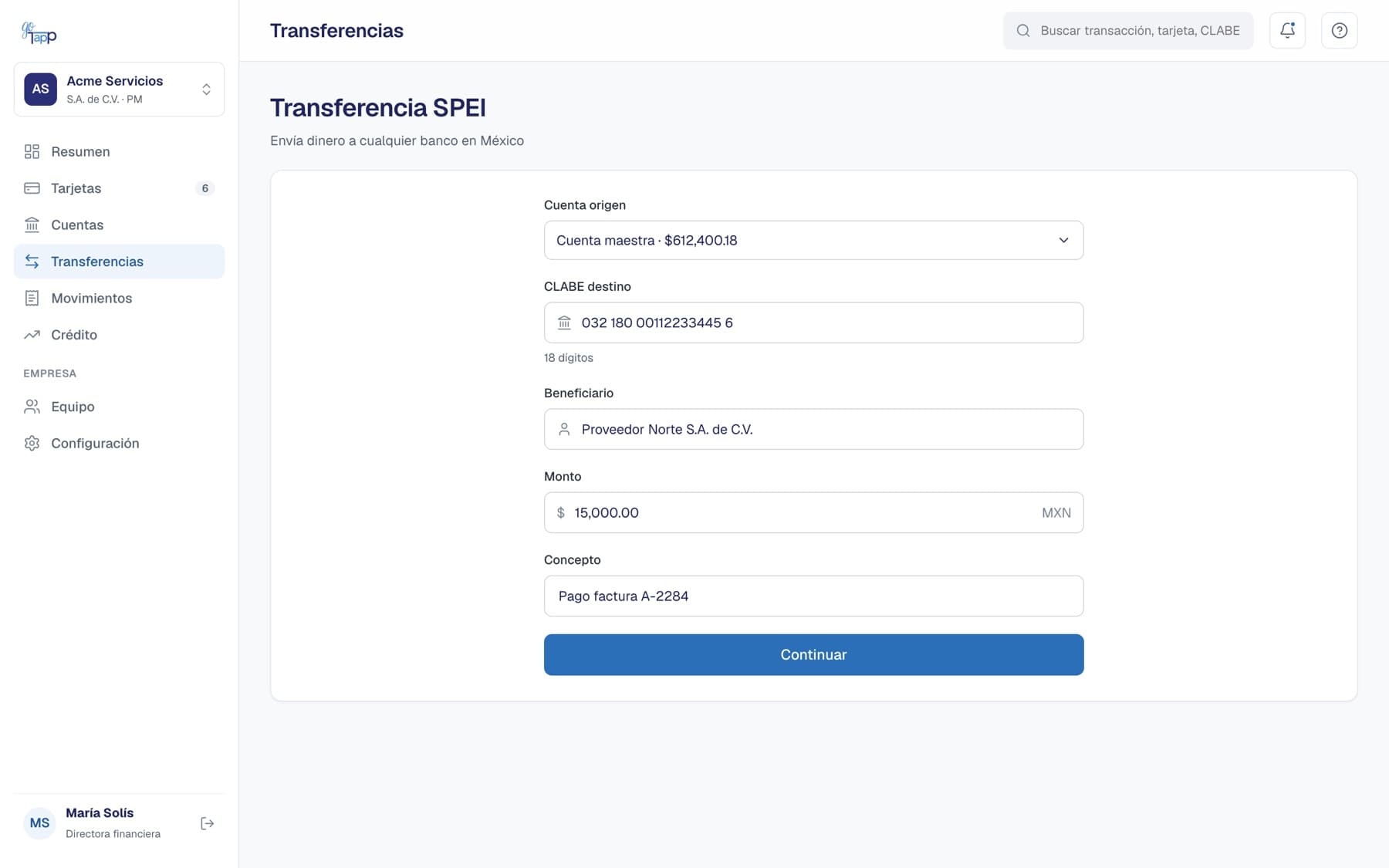
Send SPEI to any bank in Mexico, receive customer payments into the CLABE of the right area, and schedule bulk payouts.

  • 24/7 SPEI, including weekends and holidays
  • Scheduled, mass and batch payouts
  • Receipt with tracking key on every transfer
  • Second-user approval for large amounts
app.gotapp.com.mx/transferencias
SPEI transfer form with source account, destination CLABE, beneficiary, amount and description
SPEI transfer from the master account. Sample data.
Spend control

You set the rules before anyone swipes the card.

Every purchase is checked against your rules on the spot. If it does not comply, it does not go through, and we tell you why.

Salesperson paying for fuel with his GoTapp card
Sales, on the road. Their card only works at gas stations and restaurants, Monday to Saturday.
Warehouse manager paying a supplier
Operations, on the dock. Pays the supplier with a per-transaction limit and an alert to the supervisor.

Seven types of rules, combinable per card or per area.

You start with suggested rules for each area and adjust them whenever you want. Changes apply from the next purchase.

RuleExample
LimitsUp to $3,000 per purchase and $15,000 per month
Merchant categoriesOnly gas stations, restaurants and hotels
ScheduleMonday to Saturday, 7:00 to 22:00
ChannelsNo online purchases for operating cards
Allowed merchantsOnly the authorized suppliers on your list
Supervisor approvalPurchases over $10,000 need sign-off
Fraud and AML preventionUnusual transactions are blocked, always on
For your team

Each team member sees their card. The company sees everything.
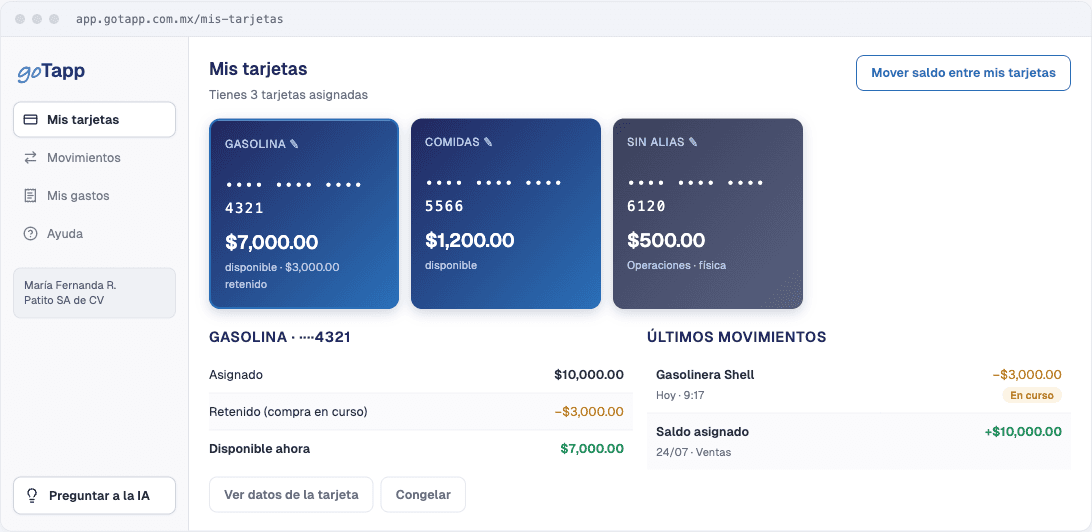
Your team checks their balance, transactions and card details from the portal or the app. No one else sees the company’s information.

app.gotapp.com.mx/mis-tarjetas
Team member view with their cards, available balance and latest transactions
Team member view: their cards, what is available and what is on hold.
GoTapp app on a phone next to a card
The app: biometrics, alerts and virtual card.
Sign in with your face

Face ID or fingerprint to open the app and confirm transactions.

Freeze with one tap

If you lose the card, block it instantly and reactivate it if it turns up.

Protected data

Number, dynamic CVV and PIN change, with additional verification.

Alert on every purchase

Amount, merchant and the rule that applied.

Your devices

See where you are signed in and sign out remotely.

Receipts up to date

Upload the receipt or invoice for each expense from your phone.

GoTapp app

Your company card, on your phone.

Check your balance, review your transactions and manage your digital card from the app.

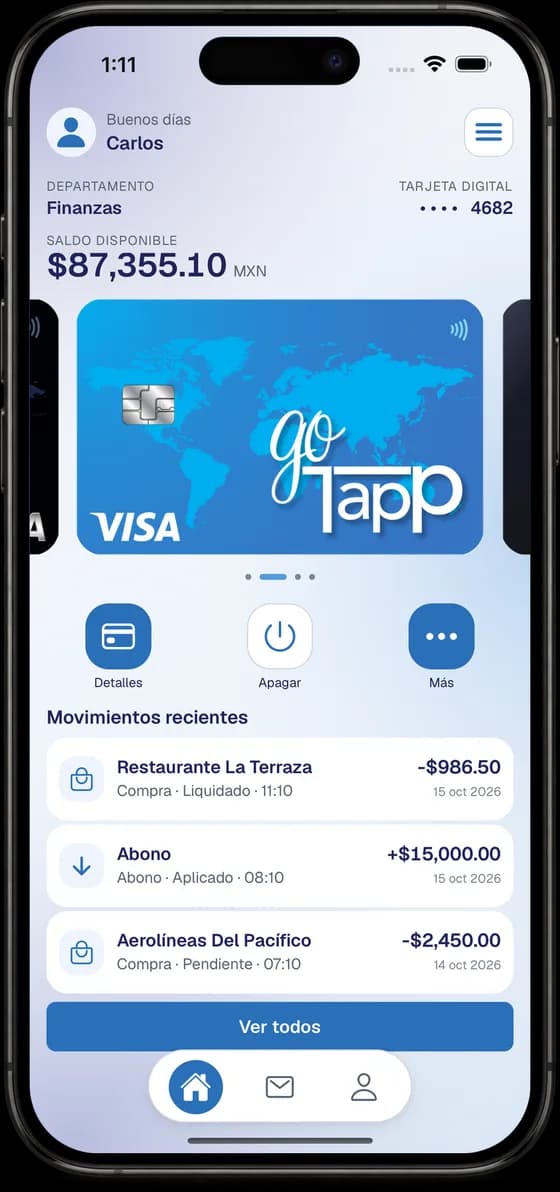
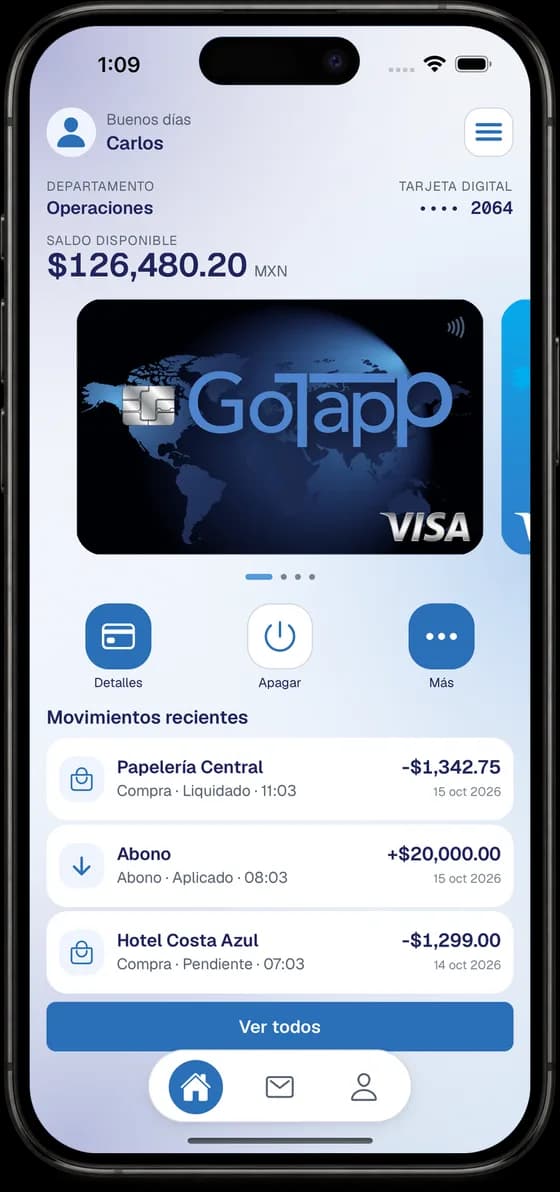
  • Your balance and card on open

    Available balance, department and digital card on the home screen.

  • Recent transactions

    Purchases and deposits with merchant, status, date and time.

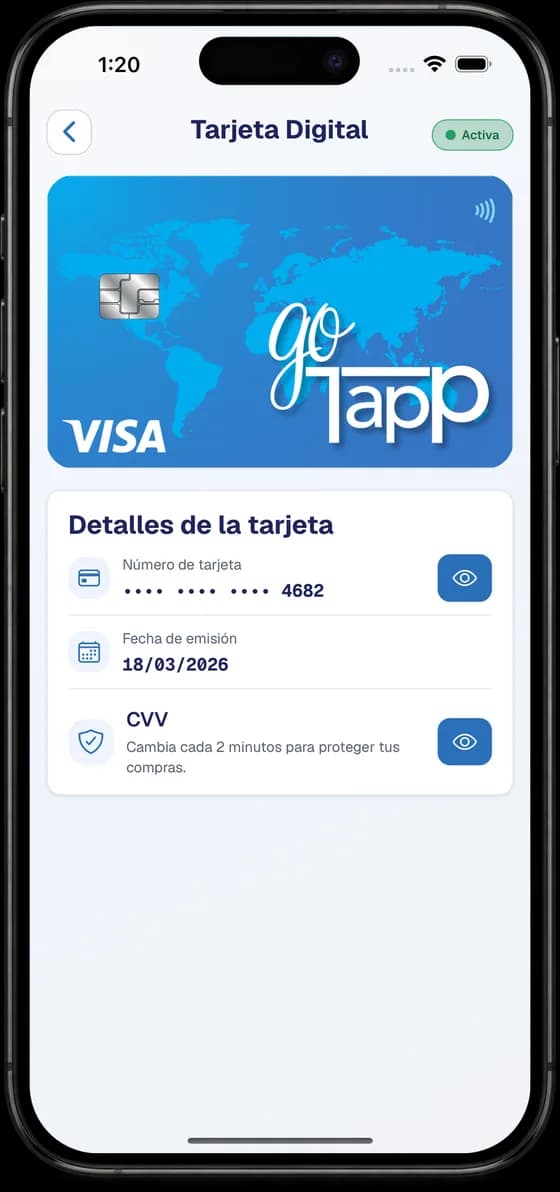
  • CVV that changes every 2 minutes

    View your digital card number and CVV only when you need them.

  • Turn your card off

    A button on the home screen, one tap away.

Available for iOS and Android
iOSAndroid
Digital Card screen of the GoTapp app with masked number, issue date and CVVHome screen of the GoTapp app with available balance, digital card and recent transactionsGoTapp app home with another digital card from the carousel and its recent transactions
App screenshots with sample data.
GoTapp assistant

Ask in your own words. You confirm and it is recorded.

The assistant does the same as you would in the portal, but moves nothing without your confirmation.

You write
“Freeze Luis’s card and raise Sofía’s daily limit to $8,000 until Friday.”
The assistant proposes

Freeze Luis M.’s card •••• 3307. Change Sofía P.’s daily limit from $5,000 to $8,000, expiring 10/17. It asks you to confirm both changes.

It goes in the log

10/13/2026 11:24
Card •••• 3307 frozen
Sofía P. limit → $8,000 (expires 10/17)
Confirmed by: Karla V., Finance

For executives and finance

Tax and corporate matters, without spreadsheets.

Multiple companies, one login

If you run more than one legal entity, you switch companies without signing out. Each with its own users, permissions, accounts and reports.

  • Legal entities and individuals with business activity
  • User profiles per company: administration, finance, view-only
  • Separate reports for your accountant

Your SAT information, organizedComing soon

With your CIEC we read your invoices and tax returns to give you receivables, collection days and tax balance, without asking for your e.firma.

  • Expense reconciliation against CFDI
  • Duplicate invoice alerts
  • 32-D compliance opinion and Tax Status Certificate (CSF) kept up to date
Company sign-up

You sign up in minutes. The answer arrives the same day.

All from the portal, with no branch visit and no printed paperwork. We read your documents for you; you just review and confirm.

< 2 hto receive the decision on your application*
  1. Create your login

    Email, password and two-step verification.

  2. Upload your articles of incorporation

    We read them for you: shareholders, attorneys-in-fact and beneficial owners.

  3. Connect your SAT

    With your Tax Status Certificate (CSF) or your CIEC.

  4. Verify your identity

    Selfie and ID of the legal representative.

  5. Get your answer

    Within 2 hours we tell you whether you are approved.

Have on hand
  • Articles of incorporation
  • Tax Status Certificate (CSF) or CIEC
  • ID of the legal representative
  • Proof of address

*With a complete file, on business days and during business hours. For legal entities and individuals with business activity.

Security and regulation

Built for a regulated financial entity.

Two-factor authentication

Verification code in the portal and biometrics in the app.

Encrypted data

Information and documents encrypted in transit and at rest.

Complete log

Who did what and when, ready for your audit.

Anti-money laundering

List screening and transaction monitoring from sign-up.

Frequently asked questions

What people ask us before signing up.

Can’t find your answer? Write to us and a person will reply.

Who can sign up?

Legal entities and individuals with business activity incorporated in Mexico, with an active RFC (tax ID).

What documents do I need?

Articles of incorporation (legal entities), Tax Status Certificate (Constancia de Situación Fiscal), official ID of the legal representative and proof of address. Everything is uploaded online.

How long does approval take?

With your complete file, we give you the decision in under 2 hours on business days and during business hours. We notify you by email and in the portal.

Where can I use the cards?

At any merchant that accepts Visa, in store or online, within the rules you define for each card.

What happens if I lose a card?

Freeze it from the app or the portal right away. No one can use it while it is frozen, and afterwards you can reactivate it or request a new one.

What is a SOFOM E.N.R.?

It is a Sociedad Financiera de Objeto Múltiple, Entidad No Regulada (multiple-purpose financial company, unregulated entity). By law it does not require authorization from the SHCP (Mexico’s Ministry of Finance) to operate, the CNBV supervises it solely for anti-money-laundering purposes (article 56 of the LGOAAC) and it is registered with CONDUSEF. It does not take deposits from the public.

Get your company’s spending in order this week.

You sign up in minutes and get a decision in under 2 hours.*